
https://www.scoop.co.nz/stories/HL2106/S00019/collabora-office-unfinished-open-source-productivity-suite.htm
|
| ||
Collabora Office: Unfinished open source productivity suite |
||
Collabora Office is a promising mobile open source document editing suite based on LibraOffice. There are versions for iOS, tested here, and Android.
At the time of writing, Collabora Office Version 6.4.8 for iOS is not ready for everyday use.
| For: | Free, open source productivity suite for iOS and Android. Plenty of features. Compatible with Microsoft Office and Open Document Format. |
|---|---|
| Against: | Unfinished, bug-ridden, unstable, user interface jars with iOS. |
| Maybe: | Has potential to be fine if Collabora is able to fix up the problems. |
| Verdict: | Avoid for now, worth watching for future improvements. |
| Rating: | 1 star out of a possible 5. |
| Price: | Free. |
| Web: | Collabora Office. |
Collabora is a UK-based private company specialising in open source software. The business sells support and services based on LibreOffice. Collabora Office is, in effect, a version of LibreOffice for iOS and Android.
The software comes with plenty of features. You can create and edit text documents, spreadsheets and presentation.
Collabora Office can open and save in a variety of open document formats along with Microsoft proprietary formats. It will also open PDFs. If you open, say, a Microsoft Word document, you can review or edit and return the finished work to a Microsoft Office user.
For
this review I tested Collabora Office on a 12.9-inch
2020 iPad Pro with a Smart Keyboard Folio and a 2020
iPhone 12.
There is a lot wrong with the user interface on iOS. It doesn’t take long to go down a user interface dead end.
While attempting to write this review, again and again I found I had to shut the app, remove it from the iPad’s memory and start again from scratch. In the end, I gave up.
In a way this review feels more like
writing a bug report for the developers.
It would be possible to write many pages about the problems encountered during the review. To keep things short, let’s look at one area:
You load Collabora
Office in the normal iPad way by touching the app icon on
one of the home screens. This takes you to a Files-like
display where you can see folders in a sidebar and any
recent documents that are in compatible file
formats.
Departing from iPad-like conventions is fine. The iOS version of Microsoft Office does this at times. But Collabora Office looks like it has been ported from a PC and left in that state. Microsoft managed to add iOS polish to its version of Office.
Before you can edit the document,
you have to find and select the pencil icon that shows up in
the bottom right corner of the display. There’s no user
interface continuity here. It feels like you are jerking
from one user interface design to another.
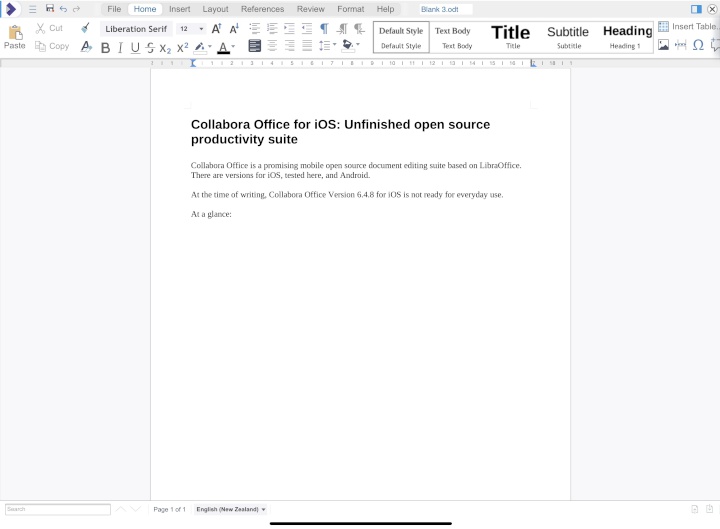
The document shows centred in what applications like Microsoft Word describe as a page view.
There’s a ruler across the top of the page. Above the ruler the document name shows… but in the case of my test document, I can only see the first four characters of the name, the rest is hidden. Presumably it is behind something.
This makes for a crowded space. It would be fine on a Mac or PC. It’s something you could live with on a large screen iPad. On smaller screens it is cramped and cluttered.
It feels like
you can select this and, maybe edit the document name. It
blinks if you try selecting the name, but nothing else
happens.
It’s possible to use the iPad stretch gesture to make the document bigger for a closer look. However, stretching is not smooth, the screen adjustment is jarring. And after a while, without touching the display, the page display got smaller and moved to the left of the screen.
The only way to get the page display back to
full-width was to close and reset the app.
At this point I had to close the app and clear it from memory yet again. You have to go all the way through the document opening steps again.
The second attempt with the pencil icon opened the document in an editing screen. This problem with documents not always opening as expected happen again and again during in my review.
There’s a
worrying instability here. During the review there were a
few times where something would work, then not work
later.
Editing works as you’d expect. You can move around the page using cursor keys or the touch screen. Selecting text is a hit and miss affair. A long press on the touch screen can select a word, but this didn’t work for me every time.
I had more success using
the keyboard cursor keys and then the shift key to select a
string of text.
Collabora Office had difficulty when I tried using the Apple Pencil. At one point it deleted text as I moved the Pencil.
In practice I found the software struggled to display certain documents. In a few cases the lines of characters overlapped with each other making them hard to read on screen. At times the page display seemed to break down altogether.
Another problem area was documents could get lost when saving.
Other iPad
writing apps are smooth. This is not. The dialog boxes that
appear are crude looking. Collabora hasn’t paid much
attention to making things look
good.
By the time you read this is may have moved on from version 6.4.8. The version history suggests the developers update the app every month.
That said, Collabora Office is unusable for day to day work at this stage.
If you want an iOS productivity suite and you can’t bring yourself to use Microsoft Office, you have options. There’s Google’s Workspace. Or you could stay with Apple’s iWorks apps. Pages, Numbers and Keynote will get the job done.
Collabora Office for iOS: Unfinished open
source productivity suite was first posted at
billbennett.co.nz.
Home Page | Headlines | Previous Story | Next Story
Copyright (c) Scoop Media