
https://www.scoop.co.nz/stories/HL2106/S00068/lenovo-ideapad-duet-chromebook-review-bargain-computer.htm
|
| ||
Lenovo IdeaPad Duet Chromebook review: Bargain computer |
||
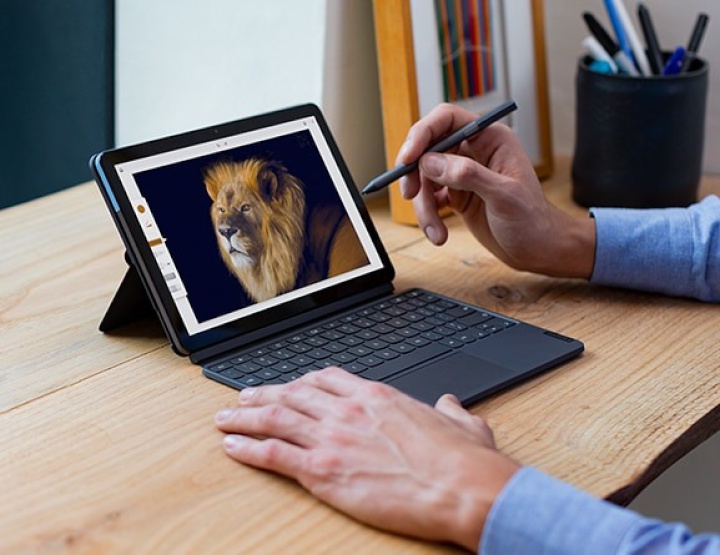
The NZ$400 Lenovo IdeaPad Duet is a small 2-in-1 Chromebook. It works as a tablet or as a ultra-portable laptop.
| For: | Great value, Includes keyboard and kickstand, battery life |
|---|---|
| Against: | Small keyboard, a few minor compromises |
| Maybe: | Has enough processor power and Ram for Chromebook tasks but won't please everyone. |
| Verdict: | The best low-cost option at the moment. Buy it you need a decent computer and you are on a tight budget. |
| Rating: | 4.5 out 5 |
| Price: | NZ$400. Have seen it sell for more in some stores. |
| Web: | Lenovo. |
Open the box and you’ll see the Lenovo IdeaPad Duet Chromebook as a tablet.
Dig deeper into the packaging and you’ll find a keyboard and kickstand. These can turn the IdeaPad Duet into a tiny laptop. It fits in a satchel, sports bag or briefcase with ease.
In its tablet form, the IdeaPad Duet about the size of a standard iPad with a 10.1 inch touch screen. It weighs 920 grams.
When used as a laptop, it has a similar
feel to Microsoft’s
Surface Go.
In almost every direct technical comparison it comes off worse. But that’s not taking its huge price advantage into account.
Nor does it do justice to the
purpose of the IdeaPad Duet. It is a Chromebook.
It works with the cloud. Much of the heavy lifting takes
place elsewhere. You don’t need a sparkling specification
for that.
A base model Surface Go and Type Cover
Keyboard will set you back $840. The cheapest iPad and Apple
keyboard cost $820. You might get by with a lower price
third-party iPad keyboard. Yet you can buy two IdeaPad Duets
for the price of one Surface or iPad.
It works fine for basic apps, but is smaller than ideal if, say, you plan to spend the next few weeks writing a book.
It will cope fine with an hour or two homework after school. I found it easy to write a news story or two on it, but was more comfortable when I got back to my normal laptop.
Lenovo has opted for a 16:10 screen.
That’s wider and less deep than you’d expect on a
laptop. There’s more bezel than you’d see on a more
expensive device. The documentation says it is 9.13mm, which
is more precise than necessary.
As you’d expect, a tiny computer has a tiny keyboard.
In practice it is not bad. I could touch type without any major problems. Take care when back-spacing to delete. You may hit the wrong key. The keyboard isn’t cramped, but it is on the cramped spectrum.
There’s a touch pad, which, again, is smaller than you see elsewhere, but not a problem unless you spend hours typing.
If you bought a Lenovo IdeaPad Duet for a school student, they’d soon learn to deal with this. It is a small compromise for having an otherwise decent computer without spending a fortune.
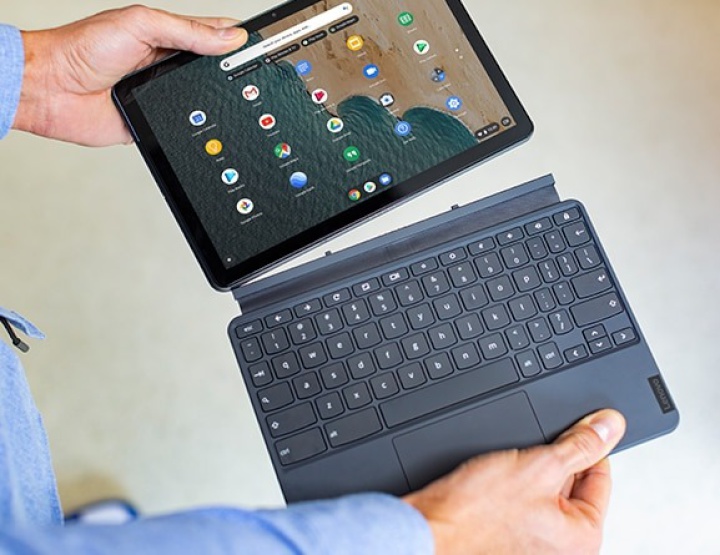
When you open out the keyboard to use the device as a laptop, the hinge is not solid. It’s not the smooth action your see on a more expensive device.
Likewise, the kickstand is awkward to
pull away from the cover at first. This improves over time.
But the whole arrangement lacks polish. A more expensive
device would finesse these design details.
The documentation describes the processor as an eight core MediaTek P60T. Graphics are powered by an integrated Arm Mali-G72 MP3 GPU. There is 4GB of Ram soldered to the board.
If you’re reading this and
thinking those specifications don’t mean much, you are not
alone. What matters is how the device performs in
use.
This is not a negative. The IdealPad Duet can handle grown-up work if you are not a power user. Browsing and Google’s web apps perform to the standard you see on devices costing $1000 or more.
During use, there
were a couple of crashes. More than you see on an iPad or
Surface Go, but nothing fatal, nothing worrying. You can
multitask if you don’t push it.
Lenovo doesn’t include a headphone socket, but
there is a dongle with a jack you can use with the single
USB connector if you’re not using that to charge the
device.
If you are new to ChromeOS, it takes time to get used to it. Once you find your feet and feel the rhythm, you’ll be fine. There will be things you miss from Windows, iOS or MacOS, but you didn’t expect to find them on a $400 device.
It’s
possible to load Android apps, but testing that is beyond
the scope of this review.
Lenovo IdeaPad Duet Chromebook review:
Bargain computer was first posted at
billbennett.co.nz.
Home Page | Headlines | Previous Story | Next Story
Copyright (c) Scoop Media