

https://www.scoop.co.nz/stories/HL2204/S00057/surface-laptop-studio-review-versatile-windows-11-pc.htm
|
| ||
Surface Laptop Studio review: Versatile Windows 11 PC |
||
Closed, the Surface Laptop Studio resembles other Surface devices. It’s larger, but otherwise familiar.
Microsoft etched its shiny four squares logo on the brushed metallic top of the laptop. That way everyone watching knows you are using a Surface1.
A hinge across the top looks
similar to the kickstand you’ll find on Surface
Pro tablets.
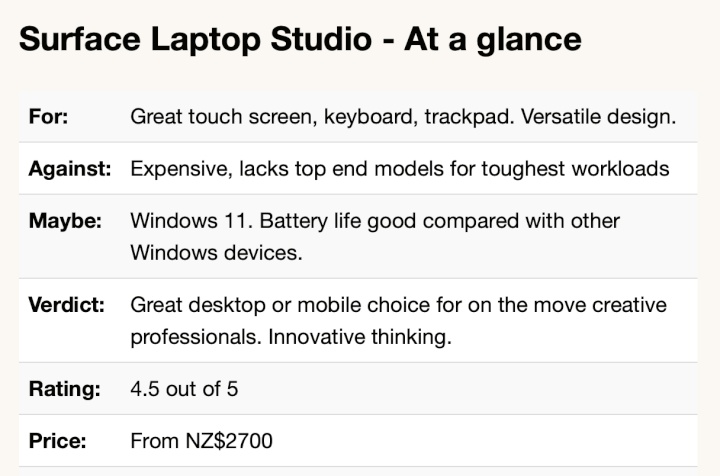
The LCD touch screen looks great from the moment it lights up. At 14.1 inches with a few mm of bezels, it is a generous size for working or playing on the move. A high 120Hz refresh rate adds to the classy look and feel.
It’s hard to find a bad display on any device that
aspires to be more than a basic bargain basement workhorse.
Yet, this is good. You may not always be conscious of the
high refresh rate, but you’ll notice it immediately if you
look at a similar size screen with a slower
rate.
This hinge may be a simple innovation, but it is what puts the Surface Laptop Studio in a class of its own. It turns the Laptop Studio into a more modern, upmarket take on the hybrid device idea.
Magnets in the lid and
elsewhere on the case help you position the screen in a
range of positions. That
way, the laptop transforms into other Windows 11
devices.
There’s a reverse position which has the screen pointing away from you. This may be useful for giving presentations to a small audience
You can fold the screen all the way down. This, in effect, reverses the lid position and turns the laptop into a thick and heavy large screen Windows tablet.
At 1.8 kg and 20mm deep, the Surface
Laptop Studio makes a hefty, thick tablet. Your arms will
tire if you hold this for a long time. Mind you, the 14 inch
screen is larger than you’ll find on other tablets. This
makes direct comparison with, say, a ten-inch iPad,
meaningless.
Artists and designers will find this handy. Whether you find these screen positions useful is another matter.
At first it takes a conscious effort to use them, we have become conditioned to using laptops in certain ways. During the short review period it never felt natural using these modes, that might change over time.
And that’s the nub of the Surface Laptop Studio.
Its signature feature is not for everyone.
When you push the computer hard, the fan will kick in. You can hear it working, it’s not silent, but nor is it noisy. You won’t be distracted and the sound should not interfere with video calls.
The fact that the Laptop Studio needs a
fan underlines
how much Microsoft’s rival, Apple, has moved ahead of
Intel processors.
Intel’s i7 is more than powerful enough for everyday users. Even the majority of power users will be satisfied. Unless you run the most demanding applications you will not want for computer power.
Yet it is no match for the processors in
Apple’s current laptops and high-end
tablets.
The graphics processor and CPU quickly get hot if you push the hardware. That’s not going to happen if you use the device for business applications, mail, web surfing and Zoom calls.
If you play games it is another story. It was noticeable during the device set up that Microsoft encourages users to sample its game playing services.
Maybe Microsoft does that with every device it
sells, yet this would be the Surface device that delivers
the best gaming experience.
Although Microsoft’s marketing describes the Laptop Studio as ‘workstation class’, that’s pushing it.
Running high end workstation apps is beyond the scope of this review, but looking at the specification, the device might struggle with heavy duty video work.
You’ll find
workstation class laptops from rival brands that sell for a
similar price to the Surface Laptop Studio, but offer more
raw power.
This is a long way behind the latest Apple MacBook Pro models that sip battery power and can run for 14 hours on a charge.
Things get worse fast if
you perform tasks where the fan kicks in. When you can hear
its gentle hum you know you’ll be lucky to get four hours
before hunting for a power socket.
Microsoft has included a first rate keyboard. This is one area that laptop buyers can overlook. Once you’ve got past the novelty of a new computer and its power or features, you can often end up feeling frustrated by a less than perfect keyboard. This can be even more the case if you buy a tablet with a keyboard like, say, the Surface Pro.
The haptic touchpad is equally excellent. It is as good as anything you’ll see from Apple. This has not been the case with Surface devices in the past.
Microsoft
missed a trick not including an SD card slot. That would be
helpful for the creative market the laptop aims to
serve.
Thankfully Microsoft avoids the bloatware that Windows rivals unhelpfully pack with their hardware. The only preloaded software is a trial version of Microsoft Office. This is hardly an imposition. Almost every Surface Laptop Studio buyer will want Office.
Microsoft’s Hello face recognition works as before. It’s a better way of logging in.
Firing up Windows 11 for the first time took the
review computer into Microsoft’s tiresome, but essential
software update process. It was a full 20 minutes before the
computer was ready to work and that is on a gigabit internet
connection. If you have a slower link, don’t expect to
open the box and get started straight
away.
Like the Touchpad, the Slim Pen has haptic feedback
which makes writing on screen feel like a pen on paper.
It’s impressive, but not essential for
productivity.
This strategy doesn’t always work. Surface Duo was ridiculous and the early Windows RT tablets flopped.
Yet, in a sense, that’s the whole point of
Surface. Microsoft got into the device business ten years
ago because it wanted to push its Windows hardware partners
into more innovation, more risk taking.
Surface devices don’t sell in huge numbers compared with hardware from HP, Lenovo, or that elephant in the room: Apple.
In round numbers Surface accounts for
about four percent of US device sales and a lower share of
worldwide sales.
Surface’s more important role is laying down
important markers and staking out turf. Microsoft doesn’t
say as much, but it’s clear it wants to show it can go
head to head with Apple with innovation. Or at least prove
it in the same league.
There’s no question the Laptop Studio is expensive. Prices start at NZ$2700, you can pay NZ$5350 for a fully-loaded model with 2TB of solid state storage, 32GB of Ram and the top-of-the-line CPU and graphics.
Microsoft wants a further NZ$200 for the Slim Pen. That’s outrageous. At these prices the pen should be bundled. That said, at least you don’t have to dig deeper to buy a keyboard. That’s annoying when you buy a Surface Pro.
The problem potential creative buyers face is the
money you’d pay for a Surface Laptop Studio can buy a more
powerful workstation class system. Go that route and you
won’t get the portability or the versatility, you will
power through your work faster.
Surface Laptop Studio review: Versatile Windows 11 PC was first posted at billbennett.co.nz.
Home Page | Headlines | Previous Story | Next Story
Copyright (c) Scoop Media