Scoop has an Ethical Paywall


SMS Threats: The Many Faces Of A Tiny Text
- Scam text messages may be small, but their impact can be huge
When you get a message you didn’t expect, and definitely didn’t want
You're
having a normal day when your phone buzzes with a new
message:
"Your parcel couldn’t be delivered –
reschedule now: [shortened link]"
It even comes
from the same thread where you previously got updates from
your real delivery company. Seems legit, right?
It’s not.
That message wasn’t from your courier. It was from a scammer pretending to be one. And if you click the link, enter your details, or install a suggested “app,” you could end up with a drained bank account, lost data, or unwanted spyware or other dangerous applications compromising your device..
In this blog, we’ll break down:
- What SMS threats really are
- The most common types of scams you’ll find in your inbox
- What scammers are searching for
- How to spot scams (and what to do) if one shows up on your phone
We’ll even show you real-world examples of these scams in action.
What is smishing?
SMS is the technical acronym meaning Short Message Service – in many places around the world, people refer to SMS messages simply as text messages or texts.
Smishing is short for SMS phishing. It happens when scammers use text messages to trick you into taking an action: usually clicking a malicious link, downloading an app, sending a code, or replying with personal or payment information.
Sometimes these messages pretend to be your bank. Other times, a government agency, delivery service, family member or even someone offering a too-good-to-be-true job. These messages are designed to look urgent, convincing, and familiar, so you act before thinking.
Why SMS?
Because it works. We check texts quickly, we trust them more than email, and many phones automatically group texts into brand-labeled threads – making it even easier for scammers to sneak in undetected.
Why you’re seeing more of these messages now
- Phone numbers are everywhere. Have you shared your number for a raffle? Coupon code? Loyalty card? On social media? That’s all it takes.
- Global scams are industrialized. These are not one-person operations. Criminal groups now run massive SMS campaigns using stolen or breached databases, message automation, and spoofed sender IDs.
- Smartphones are now wallets. With banking, two-factor authentication (2FA), and shopping on your phone, it’s a prime target for fraudsters.
- They only need a few people to fall for it. And statistically, someone always does.
The many faces of SMS threats
Let’s walk through the most common SMS scam types. For each one, we’ll explain how it works, what the scammers want, and what you should do.
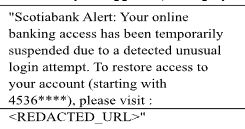
1. The fake account alert (banks, email, crypto, social)
Hook:
“Unusual login detected” / “Your account is locked” / “Urgent security check.”
Goal:
Steal your username, password, and possibly 2FA code.
How it works:
Link opens a perfect copy of a login page (bank, email, crypto exchange). Some variants tell you to call a number to “secure” your account.
What to do:
Don’t tap. Open the official app or type the address yourself. Never call numbers in the SMS. If you logged in, change your password and enable an authenticator app for 2FA.
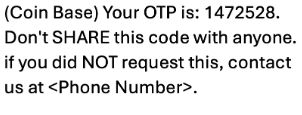
2. The OTP (code) theft
Hook:
“Reply with the 6-digit code to cancel your transaction” / “We sent a code to secure your account – please confirm.”
Goal:
Steal your one-time password to break into your account.
How it works:
Scammer triggers a real OTP from your service and tries to trick you into sharing it.
What to do:
Never share codes. If you didn’t request it, someone else probably did.
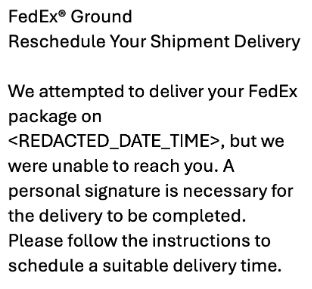
3. The undelivered package
Hook:
“We couldn’t deliver your package – pay €1.50 to reschedule.”
Goal:
Harvest credit card info or trick you into downloading malware.
How it works:
You’re sent to a fake delivery
site with a small payment form or prompted to install a
“tracking app” (especially on Android).
What
to do: Don’t follow the link. Track packages only
via the delivery company’s official app or
website.
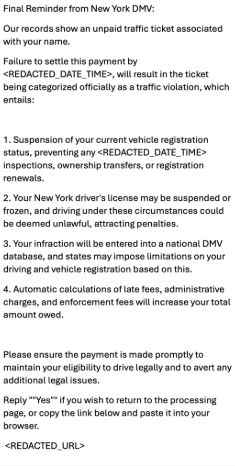
4. The tax refund or fine
Hook:
“You have a tax refund waiting– claim now.”
Goal:
Payment and identity theft on a convincing look-alike site.
How it works:
Uses branding from national tax offices, toll agencies, or other government institutions. Creates a sense of urgency with strict deadlines, and asks for card + personal data. Some texts use weird characters to bypass filters.
What to do: Always access government and other official portals directly from the official site.
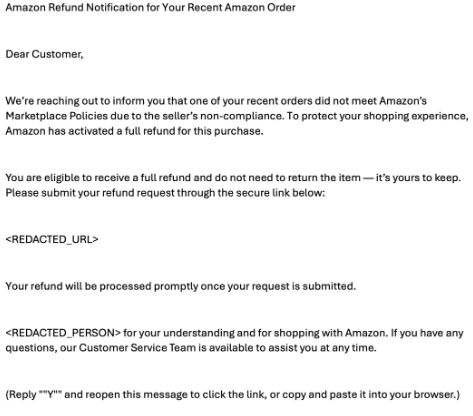
5. The fake refund
Hook:
“You are owed a refund for your flight– click here to claim.”
Goal:
Steal credit card details, ID info, or sign you up for paid services.
How it works:
Polished “claim” page with language that creates urgency. Some use homoglyphs (look-alike characters) in brand names to seem legitimate.
What to do:
Check your account or booking site directly– never through a link in a text.
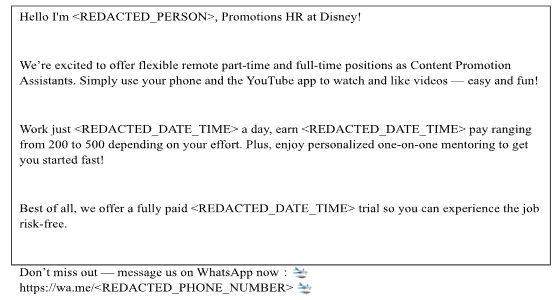
6. Jobs & side gigs (“mystery shopper”, “brand recruitment”)
Hook:
“Earn $200/day from home. No experience
needed!”
Goal: Get you to move to
WhatsApp or Telegram and then steal personal info or scam
you into paying “recruitment fees.”
How it
works: Friendly recruiter builds trust, then
pressures you into sending personal documents or paying
small fees to "start."
What to do: Treat
unsolicited job texts as scams. Verify roles on official
careers pages; never pay to
apply.
7. The crypto or investment bait
Hook:
“Hot crypto tip! Double your money in 7 days.”
Goal:
Move you off-platform and scam you into depositing funds.
How it works:
Often starts with an SMS and continues on WhatsApp or Telegram.
What to do:
Ignore unsolicited tips. Real investments don’t arrive by random text.

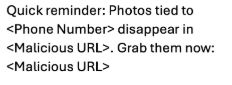
8. Cloud storage & account expiration scams
Hook: “Your storage
is full– photos tied to your number will
disappear.”
Goal: Steal account
credentials or payment details; sometimes push you to
install a malicious app.
How it works:
The message warns that your cloud account is about to expire
or that photos will be deleted unless you act now. Victims
are directed to a fake login page (to harvest credentials)
or to a payment form (to steal card details). Some versions
even include your phone number in the message to make it
feel personal.
What to do: Don’t click
the link. Instead, check your cloud account directly through
the official app or by typing the provider’s website
yourself. If you entered your login on a fake page, change
your password immediately and turn on two-factor
authentication. If you installed an app, uninstall it and
run a trusted security scan.
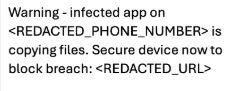
9. The “your phone is infected” / fake tech support
Hook: “Phone
infected– install our security app” / “Call support
now.”
Goal: Install a rogue app or
gain remote control of your device.
How it
works: Provides a fake antivirus/security product
page, sometimes customized to your device.
What
to do: Don’t install from links. Use official app
stores; never grant remote access to strangers.
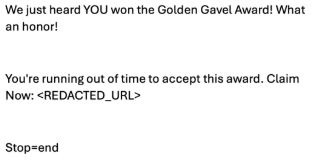
10. Prizes, surveys, coupons
Hook: “You’ve
won a phone!” / “Complete a survey for a
gift.”
Goal: Enroll you in a
premium-rate subscription or steal your data.
How
it works: Fun quiz “verification” with your
number/card recurring charges.
What to
do: Skip prize texts. If you clicked, check your
mobile bill, Apple subscriptions and cancel new
services.
11. Callback smishing vishing (voice scam)
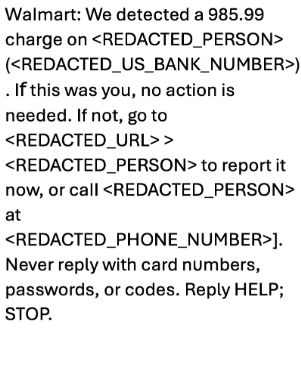
Hook: “There’s a
problem with your bank account. Call us
now.”
Goal: Trick you into calling a
scammer pretending to be your bank.
How it
works: Realistic phone scripts convince you to
“verify” your card details or install remote control
apps.
What to do: Never call back a
number from an SMS. Use the number on your card, inside the
official app, or on the company’s
website.
12. The support link to WhatsApp
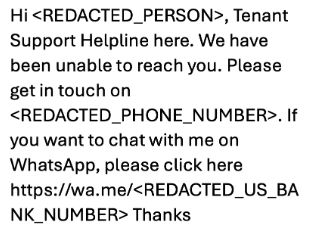
Hook: “Chat with
our agent on WhatsApp to verify your
identity.”
Goal: Move off SMS (harder
to monitor) and harvest IDs, selfies,
payments.
How it works: Deep-link opens
a chat with a fake “agent” who requests
documents/fees.
What to do: Never follow
links from SMS to chat apps unless you initiated the
conversation.
13. SIM-swap scams
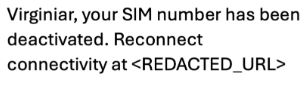
Hook:
“Your number will be deactivated– update your
info.”
Goal: Gather enough info to
steal your phone number and access your
accounts.
How it works: Scammers collect
info to impersonate you with your mobile
carrier.
What to do: Contact your phone
company directly and ask about SIM-swap
protection.
14. Family/friend impersonation (“Hi Mom/Dad, new number”)
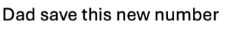
Hook: “Dad
save this new number” / “Hi Mom, I broke my phone–
message me here.”
Goal: Pull you into
a quick “emergency” payment or move you to
WhatsApp.
How it works: Emotional
pressure + urgency; requests instant transfers or
vouchers.
What to do: Don’t reply.
Call the real number you already have for that person to
verify.]
15. Messaging-app takeover (“I sent you a code by mistake”)
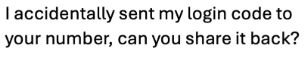
Hook: “I
accidentally sent my login code to your number, can you
share it back?”
Goal: Steal your
WhatsApp/other messenger account by grabbing the login
code.
How it works: If you share the
code, they register your account on their device and lock
you out.
What to do: Never share codes.
Turn on in-app two-step verification (a separate
PIN).
16. “Recovery” and refund-rescue scams (meta-scam)
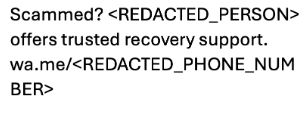
Hook:
“Scammed?
Goal: Target
people who were already scammed and charge “recovery
fees.”
How it works: Promise to get
your money back; ask for upfront payment or more personal
data.
What to do: Avoid anyone who cold
contacts you offering recovery. Report to your bank/police
instead.
Tips & Tricks
There are a number of red flags to watch out for in and SMS. The top signs include:
- Urgency + consequence: language like “today,” “final notice,” “account lock” drive people to panic and act before they think
- Unexpected links: shortened or unfamiliar domains should always be treated as suspicious
- Code requests: messages like “send back the 6-digit code”
- Channel switch: requests to “Message us on WhatsApp” or “Call this number now” can show intention of planning untraceable, malicious behaviors
- Weird wording/characters: awkward phrasing, unusual spelling or look-alike characters in brand names should always cause pause
- Payment pressure: vouchers, crypto, or wire transfers should be managed carefully over SMS
What to do if you receive a suspicious SMS
- Don’t ever click links and don’t reply. Instead, go to the official website to get information, official phone numbers and emails.
- Do not call any number shown in the SMS. Use the official app, the number on your card, or the company’s website.
- Report it to your mobile provider (many regions use 7726/“SPAM”) and to your national reporting channel.
- If you entered details: change passwords immediately; enable 2FA with an authenticator app; watch bank/credit statements and contact your bank if payment info was entered.
- If you installed an app (Android): airplane mode uninstall run a trusted mobile security scan; if banking details were involved, contact your bank and consider a full reset as a last resort.
Final thoughts: tiny texts, big threats
Scam messages may look harmless (just a few words, maybe a link) but they can be the start of a serious attack. The good news? If you know what to watch for, most of them are easy to spot and avoid.
Stay skeptical. Stay informed. And remember: no real service will ever ask for your password or code over SMS
 Stats NZ: Economic Impacts On New Zealand From Conflict In The Middle East – Report
 Advertising Standards Authority: ASA Annual Report 2025 - Platform-Neutral Regulation Keeps Pace With Digital Advertising
 Science Media Centre: Lead Pipes Banned For New Plumbing – Expert Reaction
 New Zealand Young Physicists Trust: Auckland To Host The ‘World Cup Of Physics’ In 2027; Search Begins For Student-Designed Tournament Logo
 Oxfam Aotearoa: Top CEO Pay Increased 20 Times Faster Than Workers’ Pay In 2025
 Bill Bennett: TUANZ Report - Networks Built, Value Missing